
The MUSCLE & FLESH SETUP is a versatile toolset designed to create realistic flesh and muscle simulations. I started to develop it inside Maya ,and by time all cfx part is transfered to houdini. Tool combines dynamic muscle anatomy, FEM simulations, surface dynamics, skin sliding, and wrinkle simulations to deliver lifelike muscle and flesh motion.
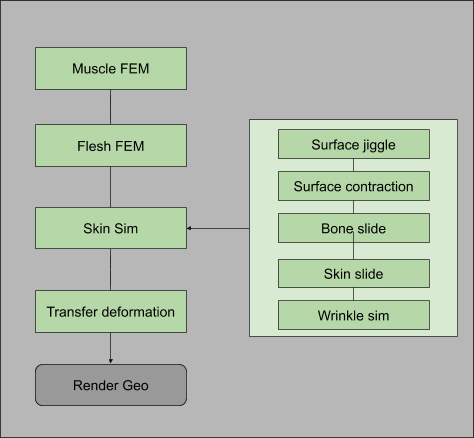
The workflow is divided into three core stages:
- Muscle Sim – Handles tension-driven dynamics for muscle behavior.
- Flesh Sim – FEM-based solid simulations for realistic deformation.
- Skin Sim – Adds superficial effects like jiggles, slides, and wrinkles.
Each stage is modular, allowing flexibility in use, with the exception of muscle simulation, which is integral to the process. This tool is built for precision, adaptability, and high-quality results across diverse projects.
A-Muscle Sim
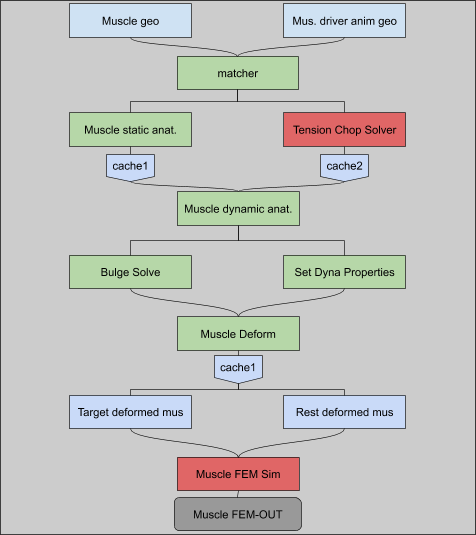
- Static Anatomy Setup
Muscle-to-Tendon Ratio: Adjusts how much of the muscle behaves like a tendon, with tendons dominating near bone attachment points. This defines key FEM simulation properties like stiffness and mass.
Independent Simulation: Muscles are simulated without skin, bones, or flesh, focusing on surface movement while maintaining their overall shape.
- Tension Solver
Tracks muscle tension and contraction during animation by monitoring area changes.
Anticipates motion with stiffness adjustments before movement and relaxes muscles after they stop moving.
Handles realistic muscle behavior, including:
Pre-motion anticipation
Contraction twitches
Relaxation when inactive
Convert muscle stretch to tension


Convert contraction and extreme muscle stretch to contraction>


- Dynamic Anatomy
Dynamic Properties Transfer: Pass properties like tension and stiffness from drivers to muscle geometry for FEM simulation.
Bulge Solve: Converts muscle contraction into visible bulges for extra realism.
Dynamic Adjustments: Adapts stiffness, strength, and other properties based on muscle state.
- Deformation and Simulation
Combines two inputs for FEM simulation:
Animation-based deformation for target positions and property updates.
Rest-length deformation for updating muscle rest lengths based on bulges.
Outputs realistic muscle motion and shape changes through FEM simulation.
This streamlined approach ensures muscles respond naturally to tension and movement while keeping simulations efficient.
B_FLESH SIM
This process prepares solid geometry for FEM simulation by assigning internal anatomical properties and dynamic behaviors. While properties can be manually set, using animated skeletons and muscle geometry automates much of the workflow.

Key Steps:
- Solid Prep
- Create an internal structure by remeshing the surface and converting it into a solid object.
- Optionally, add finer resolution near the skin for details like wrinkles.
- Anatomy Prep
- Assign anatomical properties (e.g., muscle, fat, skin) to the solid geometry using inputs like skeleton and muscle geometries.
- Dynamic properties like stiffness, mass, and target strength are applied based on these anatomical definitions.

- Local Relax & Sanity Check
- Flag problematic areas (e.g., intersections or non-uniform deformation) for softening or dynamic adjustment.
- Automatically identify and relax intersecting geometry for smoother results.
- Deformation
- Deform the solid geometry using input animation, muscle FEM simulation, or skeleton animation.
- Fine-tune deformation to preserve surface details while smoothing internal geometry for simulation.
- Flesh Simulation
- Perform the FEM simulation with dynamic properties applied.
- Deform the skin based on simulation output and optionally blend it with the input animation for enhanced results.
C_SKIN SIM
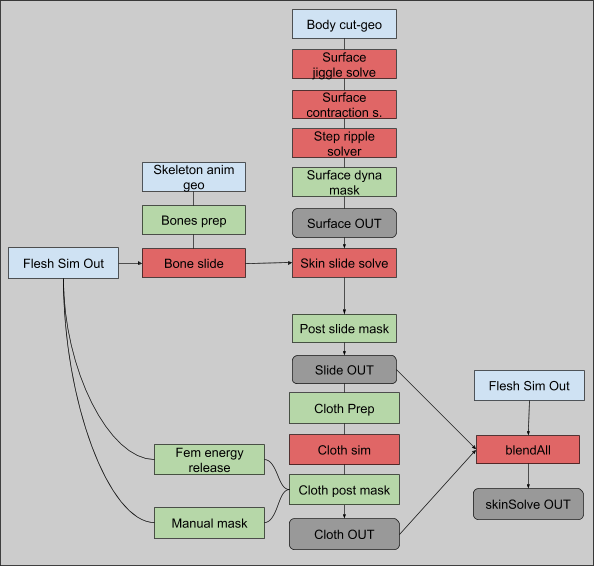
- Surface Dynamics
- Adds superficial effects like jiggle, contraction, and ripples:
- Jiggle Solve: Creates jiggle effects for motions like footsteps or sudden movements.
- Contraction Solve: Simulates muscle twitches using contraction data.
- Ripple Solve (WIP): Generates ripples from foot impacts or rapid motions.
- Adds superficial effects like jiggle, contraction, and ripples:
- Skin Slide Simulation
- Ensures skin slides naturally over bones and muscles:
- Bone Slide: Aligns flesh sim output to bones for realistic movement.
- Skin Slide: Aligns surface dynamics with flesh simulation or bone output.
- Includes steps to clean errors, mask regions, and refine sliding behavior.
- Ensures skin slides naturally over bones and muscles:
- Wrinkle Simulation
- Adds fine wrinkles in compressed areas using cloth simulation with high precision.
- Blend All Dynamics
- Combines jiggle, slide, and wrinkle effects for the final output.
 Ceyhan Kapusuz